
To display 2 footers, add Widgets and configure as seen below:
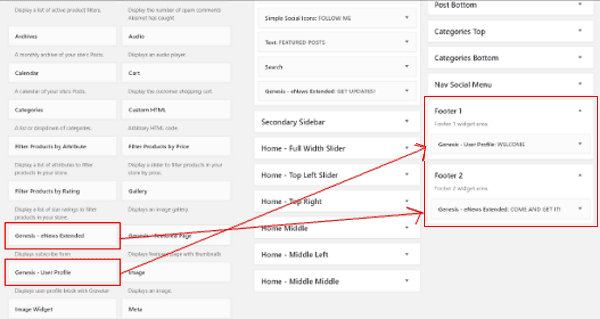
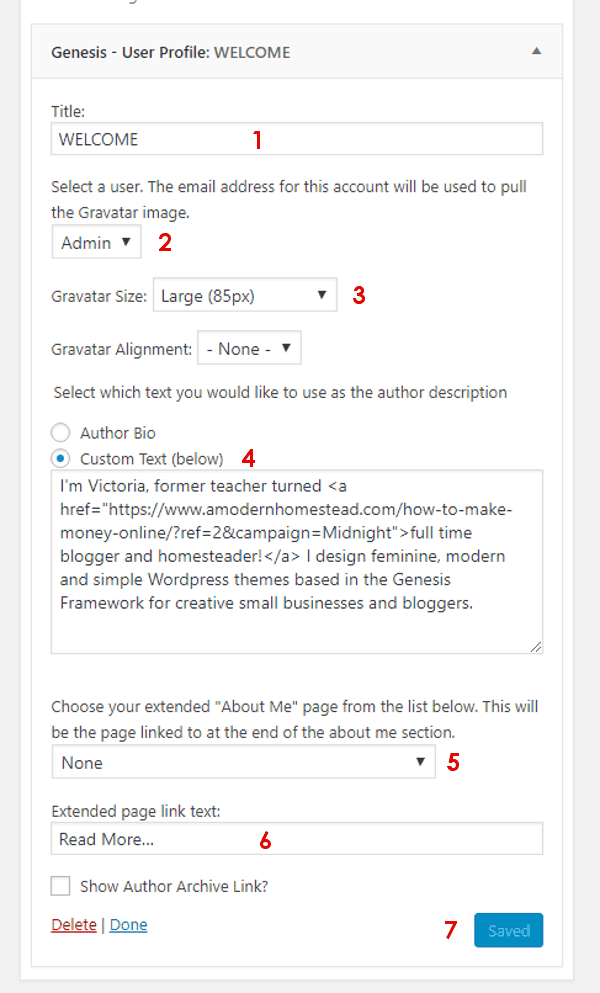
Configure "Footer 1" adding "Genesis User Profile":
- Title: Choose your widget title. This will show up above the profile. Leave it blank if you don't want a title.
- Select a user from the drop down
- Gravatar Size: Large (85px)
- Select the type of text you would like to use: Author bio or Custom Text
- (Optional) Choose your extended "About Me".
- (optional) Extended page link text: Read more
- Click the "Save" button before leaving the page
Configure your "Footer 2":
Add "Genesis eNews Extended" widget and configure it as outlined here: How do I configure Newsletter box?


